










What Is a VPN? How It Works, What It Protects and When You Need One
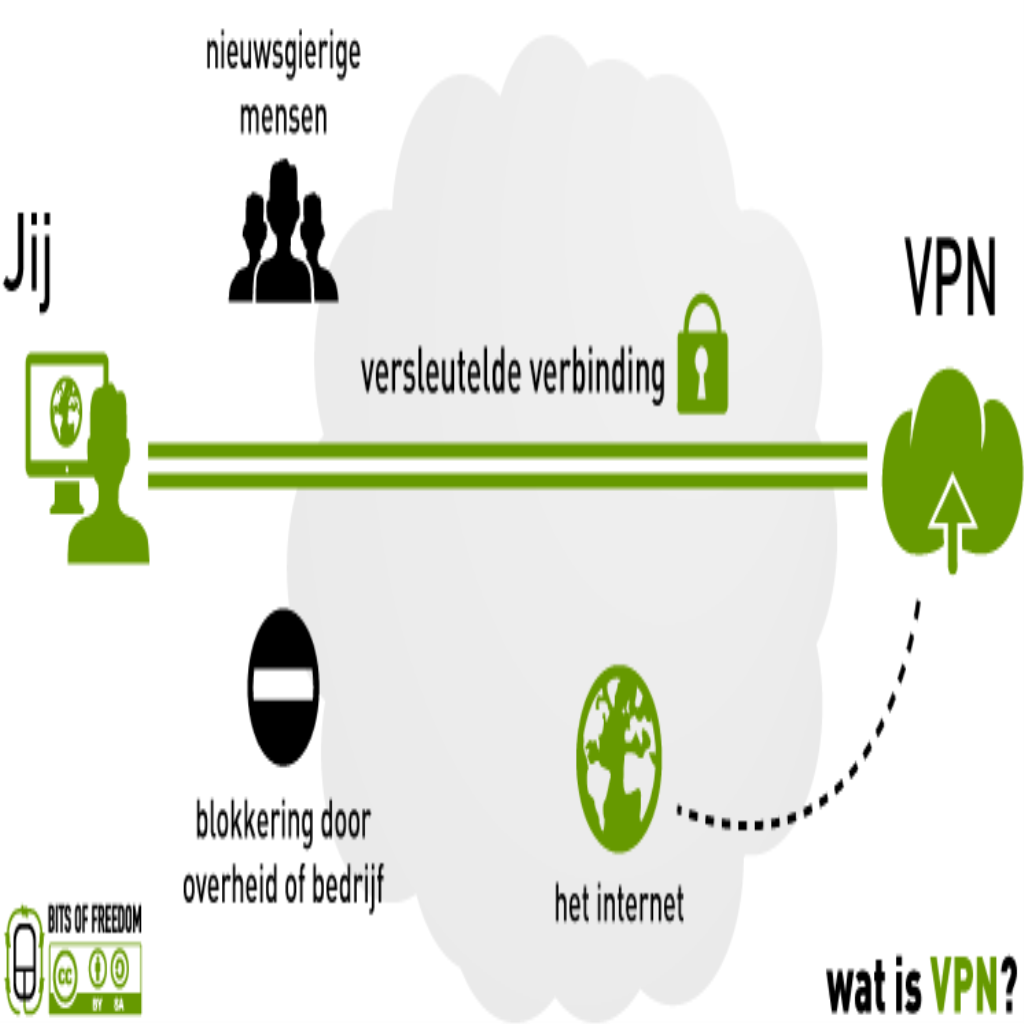
A VPN (virtual private network) creates an encrypted tunnel between your device and a remote server, hiding your traffic from your internet provider and replacing your IP address with the server’s. It is best understood as three things: privacy from your ISP, security on public Wi-Fi, and a different apparent location. It is not an anonymity tool, not an antivirus, and not a licence for illegal activity. Here is exactly what a VPN does, what it cannot do, and how to pick one if you need it.
What Is a VPN in Plain Language?
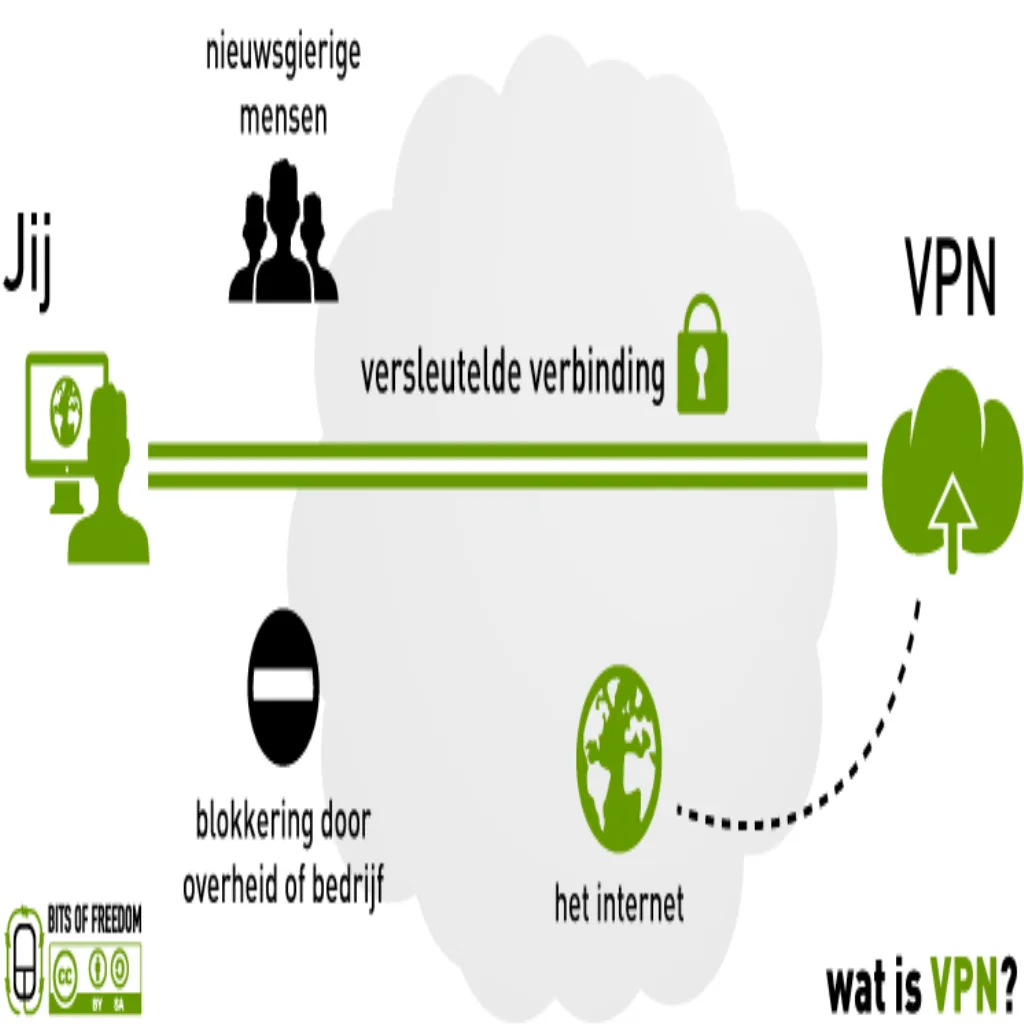
Understanding what is a VPN starts with how normal traffic travels like postcards: your internet provider (Jio, Airtel, ACT, etc.) can read every destination you visit, and every website sees your IP address — a number that maps back to your household. On public Wi-Fi, the café router itself sits in the middle and can observe unencrypted traffic.
A VPN changes both facts. Your device encrypts traffic and sends it first to a VPN server; the provider only sees an unreadable stream going to one address; websites see the VPN server’s IP instead of yours. The order of visibility flips in your favour:
| Who | Without VPN | With VPN |
|---|---|---|
| Your ISP | Sees every site you visit | Sees one encrypted stream to the VPN |
| Wi-Fi operator | Can log unencrypted traffic | Sees only the tunnel |
| Websites you visit | Your real IP and city | The VPN server’s IP and city |
| The VPN provider | — | Sees your traffic metadata (this is why the no-logs policy matters) |
Note the last row: you replace many watchers with one watcher. That is the honest trade — a VPN moves trust from your ISP to the VPN company, which is why provider choice matters more than features.
How a VPN Works: 5 Steps Explaining What Is a VPN Tunnel
- You connect to the VPN app and authenticate with the provider.
- A tunnel is negotiated. Your device and the server agree encryption keys using modern protocols — WireGuard or OpenVPN are the current standards.
- Traffic is wrapped. Every packet leaves your device inside an encrypted envelope. Your ISP can see “traffic to server X” but not its contents or destinations.
- The VPN server unwraps and forwards. It decrypts your request and sends it to the real destination from its own IP.
- Replies return through the tunnel. The VPN server re-encrypts responses back to you. Round-trip overhead is typically 5–20% speed loss on a good provider.
This is the same encryption class used for banking traffic (which is why banking over a VPN is safe — the bank’s own HTTPS adds a second independent layer).
What a VPN Actually Protects You From
- ISP visibility and logging. Your provider can no longer build a profile of which sites you visit. (They can still see you use a VPN and estimate traffic volume.)
- Public Wi-Fi risks. Coffee-shop, airport and hotel networks are hostile by default; a VPN neutralises snooping on that shared network.
- IP-based tracking. Websites and advertisers can no longer tie your sessions together through your home IP.
- Crude location blocking. Appears to browse from another city/country — useful for some services, though terms of service of platforms like Netflix restrict this use.
- Some throttling patterns. If an ISP throttles specific video or gaming traffic, wrapping it in a tunnel makes the traffic type invisible.
What a VPN Cannot Do (Common Myths)
- It does not make you anonymous. You are still logged into Google, still logged into your accounts, still fingerprintable by browser and behaviour. The IP is one identifier of many.
- It does not stop malware or phishing. A VPN tunnels traffic; it does not scan it. You still need OS updates, safe habits, and the checks in our related guide.
- It is not a legal shield. Illegal activity remains illegal; providers respond to valid legal requests. Several “no-logs” claims have been tested in real incidents — some passed audits, others failed.
- It does not make free public Wi-Fi “safe” for banking by itself. It removes network snooping, but a fake captive portal can still trick you into typing credentials. The credential hygiene matters more than the tunnel.
- It does not hide payments or account logins. Logging into your real accounts identifies you regardless of IP — by design.
The honest summary of what is a VPN good for: it solves specific problems (ISP snooping, hostile Wi-Fi, IP-based tracking). Marketers oversell it as total anonymity; it is not.
Do You Need a VPN in India? Honest Answers About What Is a VPN Good For
| Situation | VPN needed? | Why |
|---|---|---|
| Working remotely on company systems | Yes — use your employer’s | Corporate VPNs are designed for exactly this |
| Heavy use of café/hotel Wi-Fi | Worthwhile | Encrypts traffic on untrusted networks |
| Reducing ISP-level profiling | Optional | Effective, but a paid account is required and you trust the provider instead |
| General browsing at home | Mostly unnecessary | Banking and most sites already use HTTPS; VPN adds little |
| Streaming another region’s catalogue | Technically works | Violates most platforms’ terms of service; account risk is yours |
| Hiding illegal activity | Do not | Illegal regardless of tools; providers face legal process |
For most Indian users, the honest answer is: a VPN is a situational tool, not an always-on necessity. HTTPS adoption (nearly universal on major sites) already encrypts the content of your browsing; a VPN mainly hides the destination list itself.
Free vs Paid VPNs: The Real Trade-offs
The VPN industry’s core fact: running servers costs money. If you are not paying, the business model is your data, your attention, or your device:
- Free VPNs from unknown brands — multiple studies (including the CSIRO’s landmark analysis of free Android VPNs) found tracking libraries, traffic injection and weak privacy policies in a large share of them. Some free providers have suffered massive data leaks.
- Free tiers of reputable paid services — limited data/servers but honest policies; acceptable for occasional café use.
- Paid mainstream services — typically ₹300–800/month or far less on annual plans; check for independently audited no-logs claims, not just marketing.
- Corporate VPNs — what your employer runs; use as instructed for work.
Selection criteria that actually matter, in order: independent security audit history, jurisdiction and transparency reports, payment anonymity options, WireGuard/WideGuard-class modern protocols, and a kill switch that blocks traffic if the tunnel drops.
How to Set Up a VPN in 5 Minutes
- Choose a provider using the criteria above; skip unknown free apps from app stores.
- Install the official app from the provider’s site or the official app store only.
- Log in and pick a server location — nearest usually means fastest; choose deliberately for location-specific needs.
- Enable the kill switch in settings so traffic stops if the tunnel drops unexpectedly.
- Verify it works: search “what is my IP” before and after connecting — the address and city should change to the server’s.
On routers: installing a VPN at router level protects every device in the house, including TVs and consoles, at the cost of some speed and setup effort. Most mainstream providers publish router configuration guides.
VPN Limitations You Should Know Before Paying
- Speed cost. Encryption and detours cost 5–30% depending on protocol and distance; long-distance servers cost more.
- Not anonymous. Logins, cookies, payment trails and device fingerprints identify you to the sites you actually use.
- Provider trust replaces ISP trust. A no-logs claim is a promise; audits and court-tested track records are the evidence.
- Some services block VPNs. Banks and streaming platforms sometimes flag VPN IPs; expect occasional friction and re-verification.
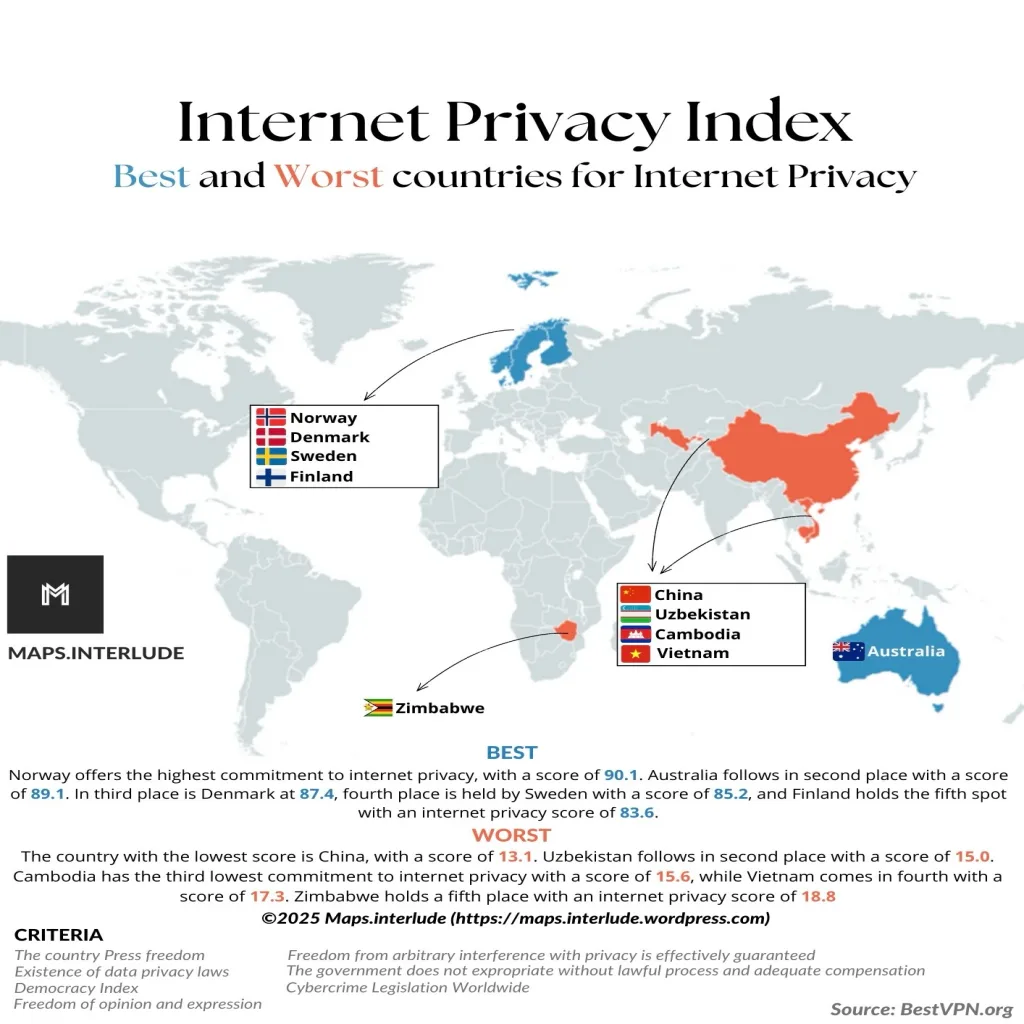
- Legal context varies. VPNs are legal in India and most countries; a few states restrict them. Using a VPN does not exempt you from local law.
VPN Protocols: WireGuard vs OpenVPN vs Legacy for What Is a VPN Encryption
The protocol is the encryption machinery of the tunnel. Current options, ranked by recommendation:
| Protocol | Status | Notes |
|---|---|---|
| WireGuard | Best current choice | ~4,000 lines of code (vs 600,000+ for OpenVPN), fastest speeds, modern cryptography, faster reconnection on mobile network switches |
| OpenVPN (UDP/TCP) | Trusted veteran | Two decades of audits; slower than WireGuard but extremely reliable; TCP mode tunnels through restrictive firewalls |
| IKEv2/IPsec | Good, niche | Strong on mobile roaming; common in corporate setups |
| L2TP/IPsec | Legacy | Superseded; no reason to choose today |
| PPTP | Broken | Crackable encryption from the 1990s; any provider still offering it as default is a red flag |
Most reputable apps default to WireGuard with OpenVPN fallback — that default is correct for nearly everyone. If a provider’s marketing leads with proprietary “military-grade” protocols, that is wordplay: the credible standards are the open, audited ones.
Kill Switches, Split Tunnelling and Other Features That Matter
- Kill switch (essential). If the tunnel drops for a second — network blips happen constantly — the kill switch blocks all traffic until it reconnects. Without it, your real IP leaks during those gaps. Verify the feature exists in the app, not just the sales page.
- Split tunnelling (useful). Routes chosen apps outside the VPN — e.g., banking app direct (avoiding foreign-IP fraud flags), everything else through the tunnel. Handy, with the trade-off that split apps lose protection.
- Multi-hop (niche). Chains two VPN servers. Slower; relevant mainly to journalists and high-risk users, not everyday privacy.
- Obfuscation (situational). Disguises VPN traffic as ordinary HTTPS to pass networks that block it. Essential in restrictive networks; unnecessary at home.
- DNS leak protection (must-have). The VPN must also carry your DNS lookups; otherwise your provider still sees every domain name you resolve. Test with any “DNS leak test” site after connecting.
Public Wi-Fi: Where a VPN Earns Its Keep
Airport, hotel and café networks concentrate every risk the tool addresses:
- Evil-twin hotspots. A laptop named “Airport_Free_WiFi” may not belong to the airport. Anyone can broadcast a hotspot; connecting hands your traffic to a stranger.
- Packet sniffing. Neighbours on the same network can capture unencrypted traffic with free tools. HTTPS limits the exposure, but not every app and background service uses it perfectly.
- Session hijacking. On unencrypted logins, an attacker on the network can steal session cookies and reuse them.
Layered defence for travel: connect to the official network after confirming its exact name with staff, turn on the VPN before opening any app, avoid logging into sensitive accounts unless necessary, and prefer mobile data for banking — Indian 4G/5G with a SIM is architecturally safer than any shared hotspot.
Business VPNs vs Consumer VPNs: Not the Same Product
“Corporate VPN” and “consumer VPN” share an acronym but solve different problems:
- Business/remote-access VPN — your employer runs it to give staff secure entry into internal systems (file servers, intranets, tools). Identity is verified by the company; activity is, if anything, more monitored. Use it as instructed for work.
- Consumer VPN — a commercial service for personal privacy on the open internet. No company verifies you; the provider’s privacy policy is the contract.
- Site-to-site VPN — links whole office networks across locations; invisible to end users.
Confusing them produces bad decisions — like refusing a work VPN because “VPNs are for hiding things,” or expecting a consumer VPN to grant office access. They are different doors for different buildings.
VPNs and Streaming, Gaming and Torrenting: Straight Answers
These are the most-searched VPN uses, so here is the honest position on each:
- Streaming. Connecting to another country’s catalogue works technically with some providers, but it violates the platform’s terms of service and platforms actively block known VPN IP ranges — expect cat-and-mouse, and occasional account friction. Decide with open eyes.
- Gaming. A VPN usually adds latency, so it is not a performance tool. Legitimate uses: avoiding DDoS in competitive lobbies, accessing region-locked game servers, or hiding your home IP from rivals.
- Torrenting. Legality depends entirely on what is shared — public-domain content is fine, pirated content is not. Technically, some ISPs shape P2P traffic; a tunnel hides the traffic type. Your responsibilities do not change.
- Price shopping. Flight and hotel prices sometimes differ by region. Results are inconsistent and terms of service apply; savings rarely justify the friction for most users.
VPN Trends in 2026: What Changed Recently
The landscape shifts, and stale advice circulates forever. Current state of play:
- WireGuard won. Nearly every reputable provider now defaults to WireGuard or a derivative; connection times dropped from seconds to near-instant.
- India’s CERT-In rules (2022 onwards). VPN providers with Indian servers must retain subscriber records for 5 years, which pushed several providers to offer virtual Indian locations (servers physically elsewhere). Privacy expectations should be adjusted accordingly.
- HTTPS is near-universal. The original “VPN protects your logins on public Wi-Fi” pitch matters less now that banks and major sites encrypt everything themselves; the tool’s centre of gravity has shifted to destination-hiding and IP-swapping.
- Audits became table stakes. The reputable tier of the industry now publishes regular independent no-logs audits; providers without any audit history are increasingly outliers.
Frequently Asked Questions
What is a VPN in simple words?
A VPN is an encrypted tunnel that carries your internet traffic through a server run by a VPN company. Your internet provider sees only the tunnel, and websites see the tunnel server’s address instead of yours. It is a privacy and security tool for specific situations, not an invisibility cloak.
Is using a VPN legal in India?
Yes. Using a VPN is legal in India for lawful purposes. Illegal activity remains illegal regardless of the tool, and providers can be compelled by legal process to share available information. CERT-In regulations require Indian VPN operators to retain certain user records — another reason privacy claims deserve scrutiny.
Do I need a VPN at home?
Usually not. Home broadband plus HTTPS-secured websites already encrypt most of what matters. A VPN adds value at home mainly if you want to reduce ISP-level logging or access location-specific services — both situational reasons, not necessities.
Can a VPN steal my data?
A VPN provider sees what your ISP would otherwise see — that is the architectural trade. Reputable providers commit to no-logs policies backed by independent audits; shady free VPNs have been documented injecting ads and selling data. Choose providers with audit history; treat unknown free VPNs as untrusted.
Does a VPN make me anonymous to Google and Instagram?
No. You log into these services with your identity, and they track you with cookies and device fingerprints across sessions. A VPN hides your IP from them, which is one identifier among dozens. Anonymity requires far more than a VPN.
Will a VPN slow down my internet?
Yes, modestly — typically 5–20% on nearby servers with modern protocols like WireGuard, more on distant servers. If a “VPN” dramatically speeds up your connection, that usually means your ISP was throttling the specific service you were using, which the VPN hid.
What should I look for when choosing a VPN?
In order: independently audited no-logs policy, modern protocols (WireGuard/OpenVPN), a working kill switch, transparent jurisdiction and ownership, reasonable price on long plans, and servers in the locations you actually need. Brand fame matters less than verifiable audit history.
The Bottom Line
A VPN is a useful, well-understood tool: it encrypts your traffic end-to-provider, hides your browsing destinations from your ISP, protects you on hostile Wi-Fi, and changes your apparent location. It does not make you anonymous, does not replace security software, and does not legalise anything. For most people in India, it is a situational tool — worth having for travel and café work, optional at home, and essential only for specific professional reasons. If you buy one, buy from an audited provider with a working kill switch; if you use a free one, use a reputable company’s free tier, never an unknown app.
Related: Is This Website Safe? 8 Checks and 10 Best Free AI Tools.
Sources
- CSIRO — Cyber security research including Android VPN analysis
- Electronic Frontier Foundation — Privacy and security guides
- UK NCSC — VPN guidance for organisations
- CERT-In — Directions and advisories for Indian users
Explore more on Dangit: health, technology, science, nature, featured, lifestyle, society, the local business directory and more reading.







[…] Related: Is This Website Safe? 8 Checks and What Is a VPN?. […]
[…] Related: Is This Website Safe? and What Is a VPN?. […]
[…] What Is a VPN? 7 Best Facts on How It Works and When You Need One […]